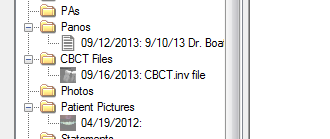
Here is a neat trick for storing Anatomage Invivo viewer .inv CBCT files in the OD Images module:
1) create a folder Setup > Definitions > Image Categories > CBCT
2) import the Invivo .inv file for the selected patient in to this folder in the Images module
3) Now when you want to look at the file, just double-click it in the images module - Invivo viewer will automatically launch to view the file, no bridge required.
Nice and tidy.
Cheers,
Bill Starck, DDS Big Idea Software, LLC
Developer, EASy(Electronic Anesthesia System) for Open Dental
817-807-1709
TX, USA
That is pretty cool, but you don't even have to import the actual file if you don't want to change (or duplicate) where you store your CBCT files. You can keep it where it is on your network and paste a shortcut to the file (or to any folder for that matter) in the patient's A-to-Z folder and it will show up under Thumbnails in the Image Module. You can then move it down to any image folder you like.