Neat trick for Anatomage CBCT files
Posted: Mon Sep 16, 2013 3:46 pm
Here is a neat trick for storing Anatomage Invivo viewer .inv CBCT files in the OD Images module:
1) create a folder Setup > Definitions > Image Categories > CBCT
2) import the Invivo .inv file for the selected patient in to this folder in the Images module
3) Now when you want to look at the file, just double-click it in the images module - Invivo viewer will automatically launch to view the file, no bridge required.
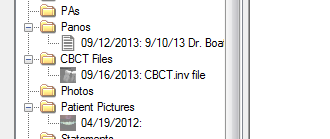
Nice and tidy.
1) create a folder Setup > Definitions > Image Categories > CBCT
2) import the Invivo .inv file for the selected patient in to this folder in the Images module
3) Now when you want to look at the file, just double-click it in the images module - Invivo viewer will automatically launch to view the file, no bridge required.
Nice and tidy.

