Page 1 of 1
Open Dental Plugin to use IntraOral Cameras
Posted: Thu Jan 05, 2017 6:18 am
by Justin Shafer
A plugin to make IntraOral Cameras work with Open Dental using DirectShow instead of Twain.
*Works with Open Dental 16.4.15 or higher
Download and run the installer for IOC Snapshot, and it will install the plugin automatically.. Be sure Open Dental is closed on the workstation while you are installing the plugin.
http://iocsnapshot.com/IOC_Snapshot.exe
Installation Instructions:
http://iocsnapshot.com/installation-man ... en-dental/
2 Week Evaluation License:
FgKgAaQGdfufAtQBDgABARQ6EjbSfoG2H9yeiyQaNZAc3R0SWbzUbWSIWxFz7yDoZnwqN3yplLa9suVyGuVesw==
Possible Bugs: If you have a webcam in a laptop, you should probably disable this camera in device manager.
Warning: If you upgrade from 17.3 or lower, to 17.4 or higher, you must reinstall this program to add the correct files back into the Open Dental folder.
How to use:
Step 1: Click the
Import Button in the Images Module to bring up the Open Dental Camera interface. Click Capture to take images or you may try a foot pedal.
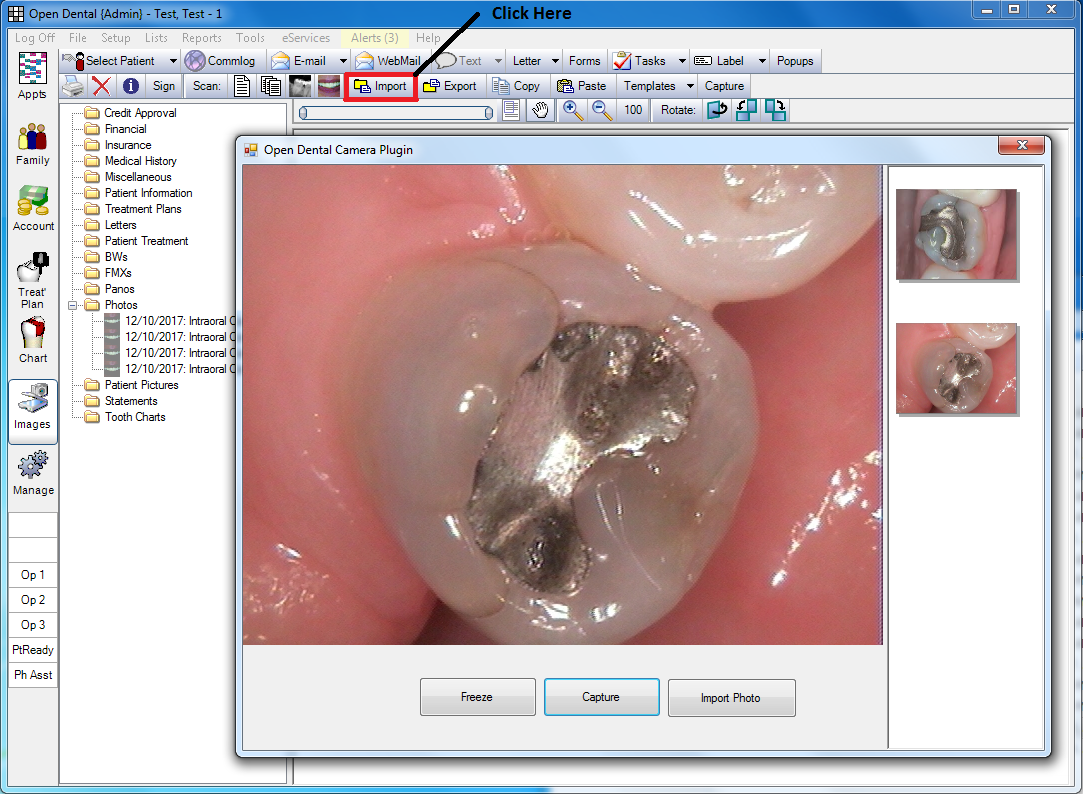
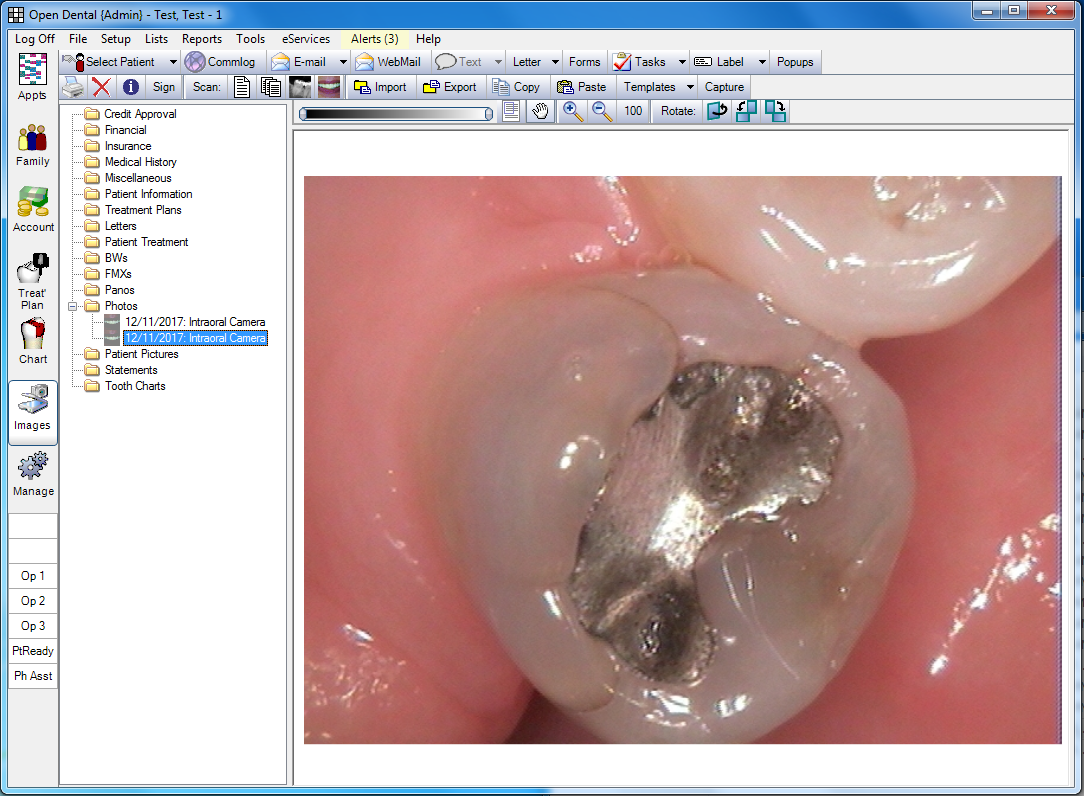
Step 2. When you close the window the images will be assigned in the "Photos" category and "Intraoral Camera" will be the description of the images.
Link to the thread about my
IOC Snapshot Program:
viewtopic.php?f=1&t=5225&p=27580
Re: A FREE Open Dental Plugin to use Cameras without Twain
Posted: Thu Jan 19, 2017 8:23 am
by SmileShoppe
Justin,
Thanks for all your working with making various hardware accessories compatible with OpenDental.
Question, can this be adapted for use with webcam capture into "Patient Images" versus using VideoDS.DS?
Re: A FREE Open Dental Plugin to use Cameras without Twain
Posted: Sat Jan 21, 2017 10:44 pm
by Justin Shafer
That's exactly what this does. I have it hard coded to go into the "Photos" category instead of "Patient Pictures".
Those 2 categories confuse me. I think of Patient Pictures as the picture you might take when they walk in, or in the chair, not of teeth? Patient Portrait = Patient Pictures?
Re: A FREE Open Dental Plugin to use Cameras without Twain
Posted: Tue Jan 24, 2017 10:08 am
by dgraffeo
Images in the Patient Pictures directory (the first in the list, I believe) will show up when appointments are hovered over in the appointment module, and you have it set up to show patient pictures in the bubble that shows. Yeah, it's more for identifying patients or having pictures of them.
Re: A FREE Open Dental Plugin to use Cameras without Twain
Posted: Tue Jan 24, 2017 12:25 pm
by Arna
Justin Shafer wrote:That's exactly what this does. I have it hard coded to go into the "Photos" category instead of "Patient Pictures".
Those 2 categories confuse me. I think of Patient Pictures as the picture you might take when they walk in, or in the chair, not of teeth? Patient Portrait = Patient Pictures?
You're exactly right. I would have personally called it "mug shots", but hey, not my software

(and you can rename those folders, anyways)
Re: A FREE Open Dental Plugin to use Cameras without Twain
Posted: Fri Jan 27, 2017 9:11 am
by Justin Shafer
double posted.
Re: A FREE Open Dental Plugin to use Cameras without Twain
Posted: Fri Jan 27, 2017 9:11 am
by Justin Shafer
That's funny! "mugshots"

Re: A FREE Open Dental Plugin to use Cameras without Twain
Posted: Wed Feb 01, 2017 12:34 pm
by Arna
Justin Shafer wrote:That's funny! "mugshots"
Trust you to have an opinion
Re: A FREE Open Dental Plugin to use Cameras without Twain
Posted: Tue May 02, 2017 4:36 pm
by Arna
***** ATTENTION *****
It has been reported that there are some compatability issues with this plugin and newer versions of Open Dental. There has been a reported loss in functionality in version 16.4.
Unfortunately, Justin is unable to work on this project right now, so please consider this plugin before updating your software.
Re: A FREE Open Dental Plugin to use Cameras without Twain
Posted: Wed May 03, 2017 11:10 am
by Arna
OK- so we think we have it figured. The issue with the software is not Open Dental specifically, but with AVAST and AVG.
https://forum.avast.com/index.php?topic=201702.0
If you are getting a black screen when trying to use your intraoral camera and have AVAST installed, you may want to visit the link above (and consider a different antivirus if they don't resolve this ASAP).
Re: A FREE Open Dental Plugin to use IntraOral Cameras
Posted: Sat Dec 23, 2017 4:26 am
by Justin Shafer
I added support for this type of camera as of tonight, works well with my plugin and IOC Snapshot program.
https://www.amazon.com/dp/B01N44NTZU?psc=1
The camera does 1280x1024 snapshots, and I have the preview window running at 640x480. Works well with VixWin and Open Dental if you use my IOC Snapshot program and Dexis 10, not so well with Dexis 9.. choppy frame rate. Not sure about other programs.
Re: A FREE Open Dental Plugin to use Cameras without Twain
Posted: Mon Dec 25, 2017 7:45 am
by Justin Shafer
Arna wrote:OK- so we think we have it figured. The issue with the software is not Open Dental specifically, but with AVAST and AVG.
https://forum.avast.com/index.php?topic=201702.0
If you are getting a black screen when trying to use your intraoral camera and have AVAST installed, you may want to visit the link above (and consider a different antivirus if they don't resolve this ASAP).
Yeah.. Avast pops up a window the first time you run a camera program and asks permission to allow camera access. At least it does for me. Perhaps back in May they had a bug where Avast wasn't asking for access?
Edit: Yeah.. since they bought AVG I ran into this with some computers running Eaglesoft... It wasn't the video card driver... It was AVG.
Re: A FREE Open Dental Plugin to use IntraOral Cameras
Posted: Mon Jan 01, 2018 12:17 am
by Justin Shafer
1. Added the ability to switch cameras, when you load the plugin it remembers the last camera you used.
2. The
http://www.onsitedentalsystems.com/IOC_Snapshot.exe program will now create the Program Link in the Open Dental database for you as well as copy the DLL files to the Open Dental directory.. If you uninstall, it removes the Program Link entry in the database.
Re: A FREE Open Dental Plugin to use IntraOral Cameras
Posted: Sat Jan 06, 2018 11:14 pm
by Justin Shafer
Updated:
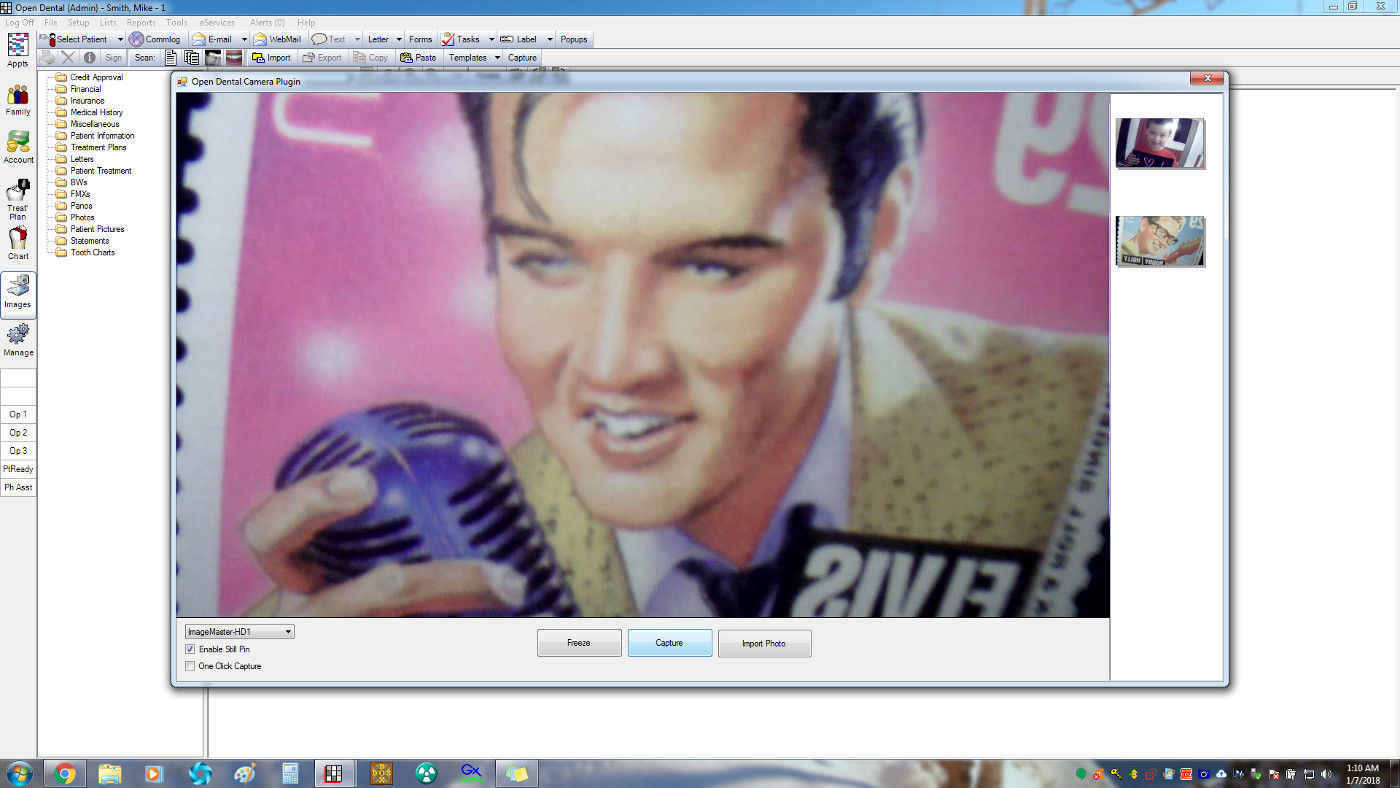
Added Support for the Image Master HD-1 Camera.
Added Support for BDA Cameras that require a Cross Bar. Like the DexCam3 camera if you use the BDA Driver instead of the WDM Driver. Or say the EZ-Cap Capture Card and an old Gendex Acucam with a foot pedal.
Fixed my installer with adding the Open Dental Program Link.
Cool eh? 1280x720
http://www.imaginsystems.com/imagemasterhd/
Re: A FREE Open Dental Plugin to use IntraOral Cameras
Posted: Thu Jan 11, 2018 11:30 pm
by Justin Shafer
Updated again:
Added support for the ProDent PD-720 Camera.
Made the window resizable and not so large on the initial run, if your camera resolution is 1280 width or higher. Also the window resizes based off the camera's aspect ratio.
The size of your window is remembered unless the camera changes.
Fixed a bug with the MD-960U Camera and others..
Switched from Bitmaps to Lossless Jpegs to save space on the server.
1 1280x1024 Bitmap Image was 5MB.. a bit too large. Now it is much smaller.
The prodent pd-720 camera claims to be 1600x1200, but the largest resolution on the still pin is 640x480.. so I went with 1280x1024 on the capture pin... The frame rate seems just right.
Re: A FREE Open Dental Plugin to use IntraOral Cameras
Posted: Tue Jan 23, 2018 5:09 pm
by Justin Shafer
Updated the plugin:
Switched from the DirectX library to SharpDX for better compatibility with Open Dental 17.3 and "the future", as Open Dental will eventually remove the DirectX dll files from Open Dental, plus SharpDX is more modern. This is to listen for foot pedal events.
Thanks to the Open Dental team for advice.
I ALSO added an installer for the free version of the plugin, and added support for version 17.4, as that did require some changes in the plugin to work with code changes in 17.4
Re: A FREE Open Dental Plugin to use IntraOral Cameras
Posted: Tue Mar 06, 2018 1:28 pm
by KristinAdahills
Is there a quicker/easier way to label images? Tooth numbers, etc
Re: A FREE Open Dental Plugin to use IntraOral Cameras
Posted: Sat Mar 10, 2018 11:18 pm
by Justin Shafer
KristinAdahills wrote:Is there a quicker/easier way to label images? Tooth numbers, etc
Not really.. you have to edit it after they are sent to Open Dental. Unless a lot of people ask for it, then I could make it standard. Maybe... maybe not. It could be harder then I think. It usually is
Re: Open Dental Plugin to use IntraOral Cameras
Posted: Sun Sep 16, 2018 5:58 pm
by kylesmithdds
I have just completed and and followed all of these steps for working with my PD-740 camera in Open Dental. When I click "import", I am still getting the window asking for me to upload a file from my computer, not the camera viewing box. Why might this be?
Re: Open Dental Plugin to use IntraOral Cameras
Posted: Sun Sep 16, 2018 6:08 pm
by Justin Shafer
Hmmm.. I don't know.. if you like call me. 817-909-4222
Did you check device manager to see if you have any other cameras active? Like if this computer is a laptop or all-in-one pc with a built in camera? If so, it needs to be disabled.
Re: Open Dental Plugin to use IntraOral Cameras
Posted: Tue Oct 16, 2018 7:36 am
by Justin Shafer
Added support for the DexCam4 HD.
Re: Open Dental Plugin to use IntraOral Cameras
Posted: Wed Oct 17, 2018 9:08 am
by Ardavan
Nice, Is the licensing per site or per station?
Re: Open Dental Plugin to use IntraOral Cameras
Posted: Wed Oct 17, 2018 10:31 am
by Justin Shafer
It is per station, thanks for asking.
Re: Open Dental Plugin to use IntraOral Cameras
Posted: Tue Dec 11, 2018 7:53 am
by Justin Shafer
New features and fixes:
1. Added more code to the plugin installer that can detect Open Dental's install directory instead of assuming it is in Program Files.
2. Ability to maximize the window and there is now a minimum window size based off the camera's resolution.
3. Added support for a new camera coming out, the MD-1090 and MD-1070 cameras which have 1280x720 or 1920x1080 resolutions.
4. Added support for the DexCAM 4 HD camera and Digi-Doc Iris HD camera.
Re: Open Dental Plugin to use IntraOral Cameras
Posted: Wed Feb 13, 2019 1:13 am
by Justin Shafer
I can now get the CS1500 twain model camera to work with the plugin, if you flash the UVC firmware.
https://justinshafer.blogspot.com/2019/ ... amera.html
Re: Open Dental Plugin to use IntraOral Cameras
Posted: Wed Feb 20, 2019 2:59 pm
by enamelrod
what camera are you recommending now that allows for use of the button on the camera?
Re: Open Dental Plugin to use IntraOral Cameras
Posted: Sun Mar 10, 2019 8:15 am
by then
Hi Justin, you mentioned you have added dexcam 4 HD.
I have just installed the ioc capture button but i don’t see this camera listed there.
Did you use different name?
Re: Open Dental Plugin to use IntraOral Cameras
Posted: Sun Mar 10, 2019 10:00 am
by Justin Shafer
For the Dexcam 4HD, set the blue camera to use the Virtual Camera, if your using the Open Dental plugin, set the plugin to use the Still Pin and one click capture checkmark boxes.
Call me if you need a hand. Sent you an email as well.