Page 1 of 1
Dropdown Program Link?
Posted: Sat Feb 17, 2018 7:28 am
by irfan
I have a program link that launches a chrome browser and points to some online documentation i created.
is there a way to make a dropdown program link so i can have shortcuts to various documents a little easier to access?
example now: click program link, chrome launches to a table of contents page. from there, click the document I want.
prefer: click dropdown link, choose document, chrome launches directly to that link. this would have a dropdown option like the "labels" "texts" "letters" buttons.
Thanks
Re: Dropdown Program Link?
Posted: Sat Feb 17, 2018 11:28 am
by wjstarck
Not currently.
That'd be a feature request
Re: Dropdown Program Link?
Posted: Tue Feb 20, 2018 6:53 pm
by Justin Shafer
Why not use the program link to make a form that then does your drop down link? Should be pretty easy using the plugin framework. Button on the toolbar.
Let me know if you need a hand with that, would be happy to help.
Re: Dropdown Program Link?
Posted: Tue Feb 20, 2018 7:26 pm
by irfan
yea... you lost me there:) link to a form with a dropdown? im having a hard time visualizing that
Re: Dropdown Program Link?
Posted: Wed Feb 21, 2018 6:38 pm
by Justin Shafer
https://github.com/jshafer817/LaunchChrome Made for Open Dental 16 or higher or maybe 15... whenever they switched to dotnet 4.5
It would look like this:
1. Drop the
http://www.onsitedentalsystems.com/LaunchChrome.dll file into your Open Dental folder.
2. Create Program Link and then restart Open Dental
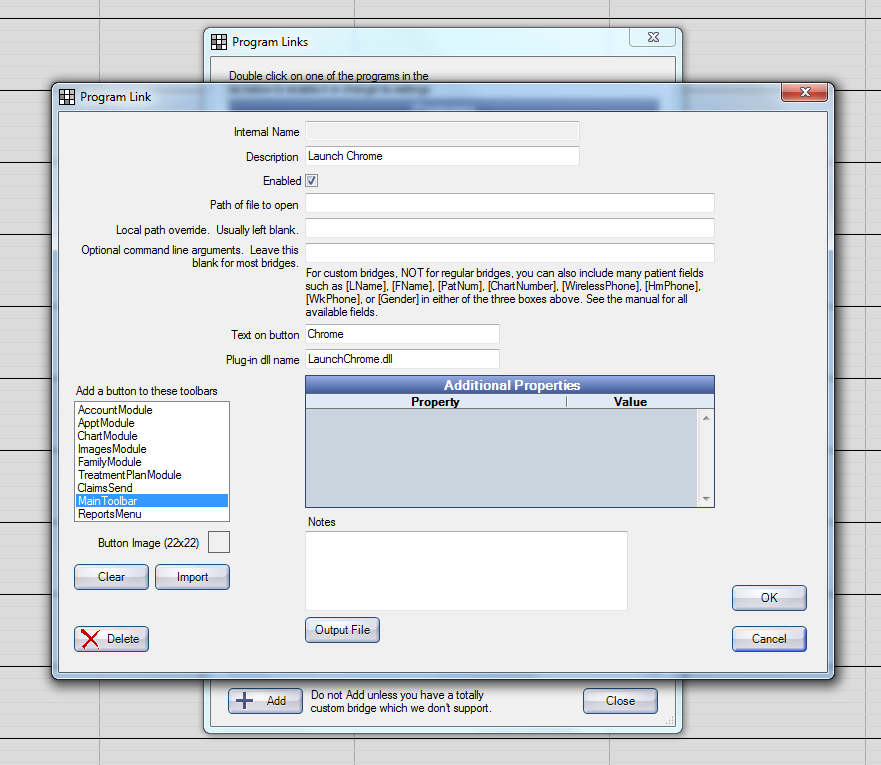
3. Run the Plugin by clicking on Chrome in the toolbar
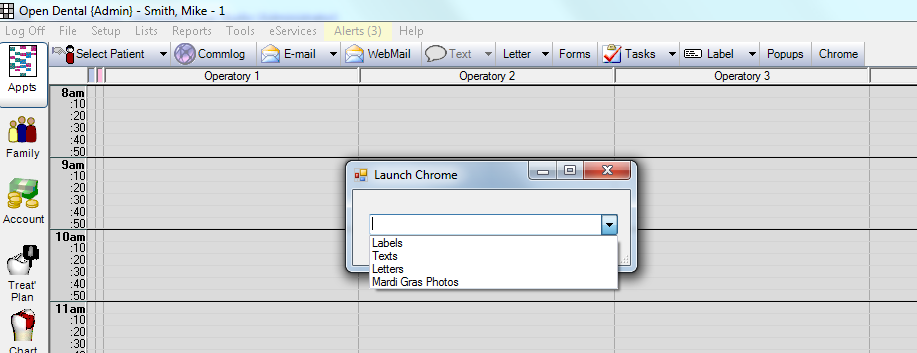
4. Whatever you click in the drop down box (combo box) will launch your default web browser to a url.
The URL's:
https://github.com/jshafer817/LaunchChr ... hChrome.cs
Re: Dropdown Program Link?
Posted: Wed Feb 21, 2018 7:47 pm
by irfan
Whoa that’s awesome. Thanks man. I use a middle tier server,I’ll send to my IT guy so he can drop it in the right folder. Or should this be installed locally at each station
Re: Dropdown Program Link?
Posted: Wed Feb 21, 2018 8:12 pm
by Justin Shafer
This should be done at each workstation, but you need to recompile the dll file for the url's and menu items that you want. Ask your IT guy to compile it for you, or send me the url's and item list. Won't take but a minute. You might want to private message me the url list.. instead of making it public? I do IT work, let me know if I can ever help you out.

Re: Dropdown Program Link?
Posted: Thu Feb 22, 2018 7:28 am
by trentwolodko
I'll just add that you will never find another remote/local Dental IT tech like Justin. No one in the niche comes even close to what he's capable of. Don't get a big head, Justin.

As for the plugin, that's cool... I'd dig around github a little more and find some code that not only opens chrome, but passes specific information to chrome via clipboad API which can then be processed by an associated chrome extension. I see a future of passing info for individual and mass webmails via gmail, autopopulating forms on partner sites/insurance co's, etc.
Google's HIPAA BAA covers the following apps... "Gmail, Google Calendar, Google Drive (including Docs, Sheets, Slides, and Forms), Google Hangouts (chat messaging feature only), Hangouts Meet, Google Keep, Google Cloud Search, Google Sites, Jamboard, and Google Vault services." There's quite a number of interesting integrations one may be able to accomplish there.
Re: Dropdown Program Link?
Posted: Thu Feb 22, 2018 9:02 am
by Justin Shafer
Thanks Trent! I just learned some programming because it bugged the hell out of me that Jordan Sparks could program...
And my oral surgeon Dr. Starck.
Re: Dropdown Program Link?
Posted: Thu Feb 22, 2018 9:59 am
by dgraffeo
Mardi Gras photos. Nice touch
Re: Dropdown Program Link?
Posted: Thu Feb 22, 2018 2:49 pm
by Justin Shafer
dgraffeo wrote:Mardi Gras photos. Nice touch
Thanks!
